Read the estate under Infrastructure
Infrastructure Operations reads the metrics your Prometheus already collects. It changes nothing on its own: its four fixes run only after a named approval.
AvailabilityAvailable in early access. Infrastructure Operations changes nothing on its own; its four fixes run only after a named approval.
Steps
- In the sidebar, choose Home, then Infrastructure operations, or Infrastructure in the switch above the page.
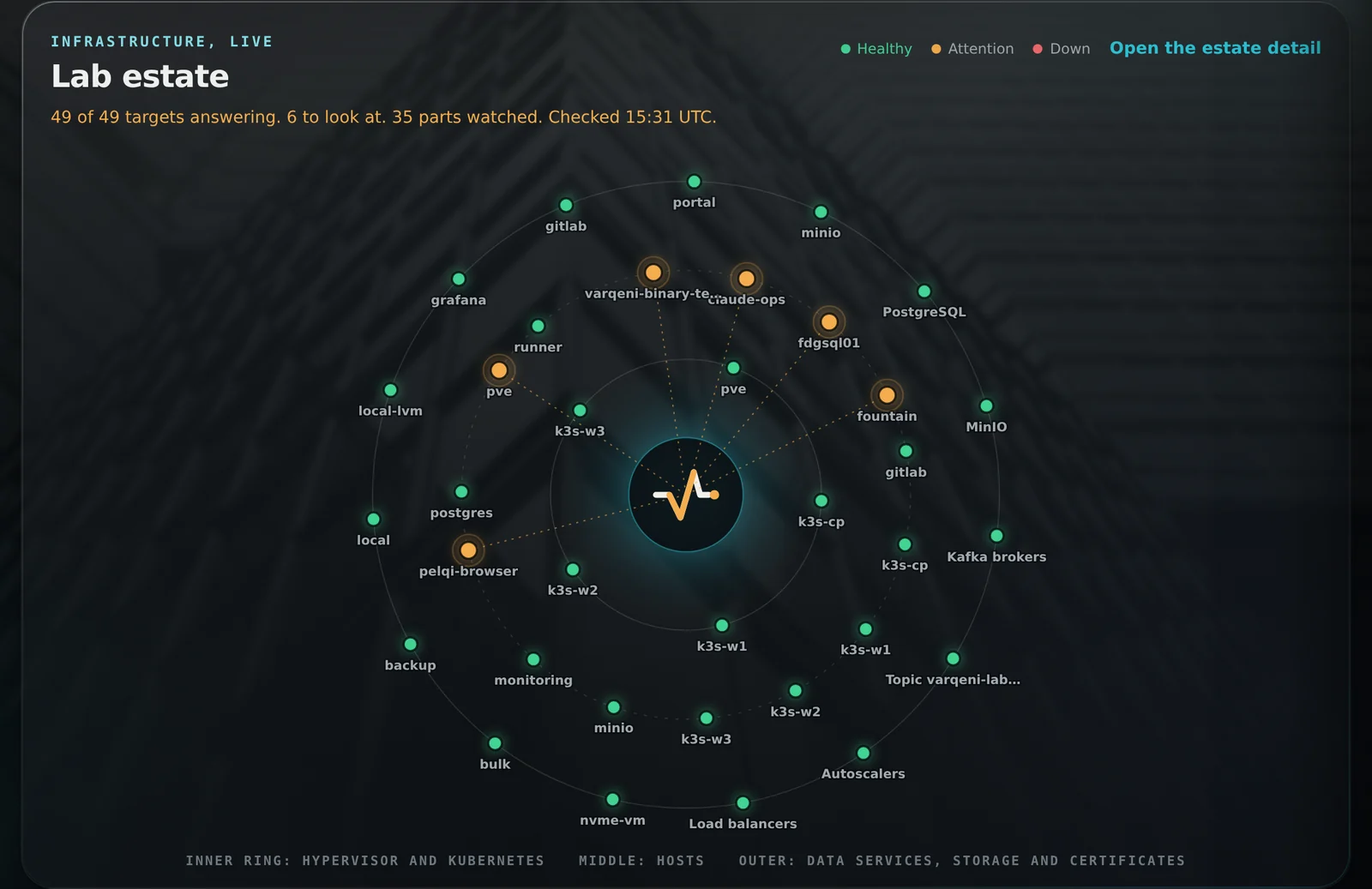
- The estate orbit opens the view: the Varqeni mark at the centre, and every part of the estate as a light on a ring around it. The inner ring is the hypervisor and the Kubernetes nodes, the middle ring the hosts, and the outer ring data services, storage pools and certificates. Green is healthy, amber needs a look and red is down. A part in trouble glows, slows down and draws a line to the centre.
- The centre sends out a soft pulse each time Varqeni reads the estate. Point at a part, or tab to it, to see its kind, its numbers and what is wrong with it; the rings hold still while you do. Click to pin it open, Esc to close. On a phone the orbit is smaller and the parts that need a look are listed under it.
- The counts at the top summarise hosts, virtual machines and Kubernetes nodes.
- Findings list anything wrong, with a severity. A down finding opens an investigation after two bad checks; a warn finding, such as a disk at 85%, is shown but never opens one alone.
- The groups below show each host, Kubernetes, data services, storage pools and certificates. The Kafka brokers row reads how many brokers answer, how many are fenced, which one is the controller, and how many partitions are under-replicated, below min ISR or offline; each topic Varqeni is told to keep fresh has its own row with the messages it received in the last five minutes. The Autoscalers row lists each one with its replicas against its maximum, and Load balancers how many have an address and whether every one has ready backends.
What you should see: Estate healthy at the top right when nothing is down, or a count of faults.
What it can and cannot do
Can
- Show hosts, Kubernetes, data services, storage and certificates from the metrics Prometheus already collects, as a live orbit around Varqeni.
Cannot
- Change infrastructure on its own. Its four fixes run only after a named approval, on listed hosts and namespaces.
Related articles
- Data, Infrastructure and Service areasThe area buttons next to the views switch between Data Operations, Infrastructure Operations and Service Operations.
- Infrastructure through PrometheusInfrastructure Operations reads hosts, virtual machines, Kubernetes, storage, data services and certificates from metrics you already collect.
- What each cause meansThe causes Varqeni names for a change data capture pipeline, in plain words.
Still stuck? Contact support or email info@fortisdatagroup.com.