Look back with the time bar
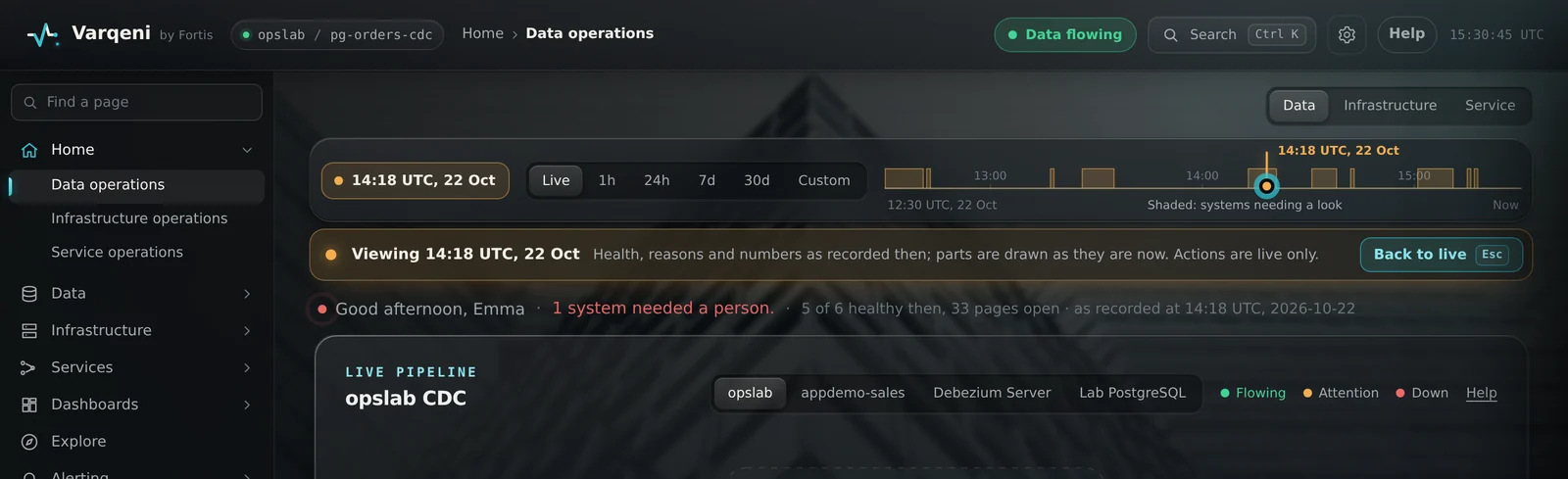
When you triage, the first question is often what everything looked like when the problem began. The time bar under the views answers it, from the history Varqeni keeps.
AvailabilityAvailable to everyone with early access to Varqeni.
Steps
- Choose a range: Live, the last hour, 24 hours, 7 days or 30 days, or Custom for any from and to, in UTC.
- Move the needle to the moment you want, by dragging it or with the arrow keys (Shift for bigger steps). Under the bar, a shaded strip shows when systems needed a look, so you can see where to go; marks on the bar show incidents, deploys and actions, and you can choose one to jump to it.
- The past, as it was. The Overview, the live pipeline, Pulse and the live map redraw as of that moment, under a banner such as Viewing 14:32 UTC, 21 Oct. Approve, silence and declare are turned off while you look at the past, since they act now.
- Compare. On Pulse, compare each line with the day or the week before, drawn as a dashed line, with the usual range shaded behind it.
- Back to live in the banner, or Esc, returns to now.
- Share a moment. The moment is in the address (?t=), so a link you send opens on the same moment for whoever has access.
What you should see: Varqeni records every signal the console shows once a minute, keeps that for 7 days, then 5-minute summaries for 90 days and hourly ones for two years. Without that archive, the bar still reaches back a few hours through your Prometheus, and says how far it can go.
What it can and cannot do
Can
- Show every system as it was at any moment in the archive, compare with the day or week before, and share the moment as a link.
Cannot
- Act in the past: approve, silence and declare work only on now. Go back further than the archive keeps.
Related articles
- The Reports viewHow fast pages are answered and incidents end, what makes the most incidents and who carries the pager, across every system.
- Read the status, headline and measuresThe status at the top right and the headline say, at a glance, whether data is flowing and what Varqeni sees.
- The live mapOne picture of everything Varqeni watches: each pipeline's data path, your services, the database, the platform they run on and the hosts underneath, live.
Still stuck? Contact support or email info@fortisdatagroup.com.